It’s 2 PM on a sweltering February afternoon in Sydney, and while the cicadas are screaming outside, your lounge room is starting to feel just as stifling. You head to the wall controller only to find a blank screen or a cryptic error code that makes no sense. We know that sinking feeling when you realise your ducted aircon thermostat is not working, especially when you’re worried about being overcharged for what might be a simple fix. It’s a common frustration for many local families, and usually, the problem feels much more daunting than it actually is.
The good news is that many thermostat issues in Sydney ducted systems are actually software glitches or environmental factors rather than a total hardware failure. As local specialists who have looked after Sydney homes since 1999, we’ve seen it all. In this guide, you’ll discover why your ducted air conditioning thermostat is playing up and learn which quick fixes you can safely handle yourself before calling in the experts. We’ll explore everything from basic power resets to decoding those confusing display messages, ensuring you have a clear path back to a cool, comfortable home.
Before you start worrying about the cost of a full replacement, it’s helpful to understand what a thermostat is and how it actually interacts with your system. In most Sydney homes, the wall controller acts as the brain of the unit, sending signals to the indoor fan and the outdoor condenser to maintain your desired temperature. When you find your ducted aircon thermostat not working, the culprit is frequently a simple power or settings issue rather than a major mechanical failure.
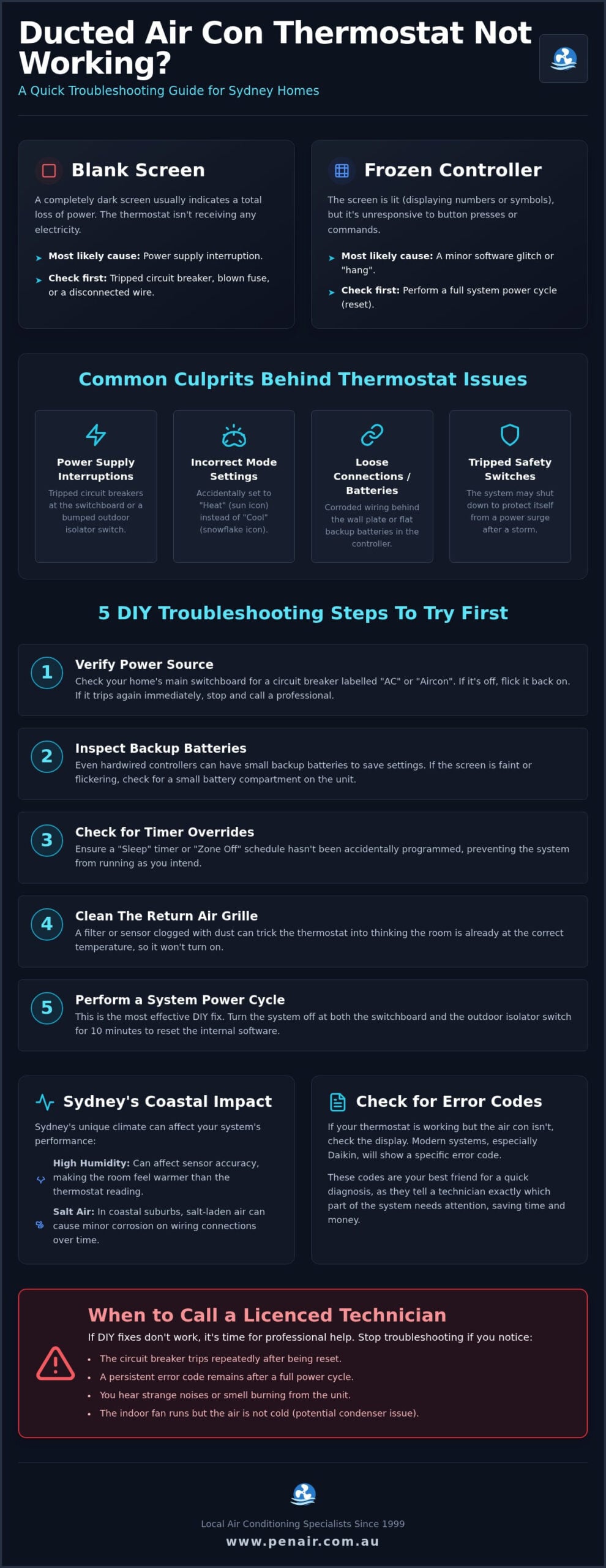
Power supply interruptions are the most frequent cause of a dead display. During a humid Sydney summer, the electrical grid often faces high demand, which can lead to tripped circuit breakers at your main switchboard. Additionally, every outdoor unit has an isolator switch that might have been bumped or turned off during garden maintenance. Another common oversight involves the batteries. While most wall-mounted controllers are hardwired, many modern systems use wireless remotes or have internal backup batteries to store your schedule during a blackout. If these are flat, the system won’t respond to your commands.
A completely blank screen usually indicates a total loss of power. This points toward a blown fuse or a disconnected wire. However, if the screen is lit but the buttons don’t respond, the internal software has likely “frozen.” You can often fix this by performing a hard reset. This involves turning off the air conditioner’s power at the switchboard for ten minutes. This allows the capacitors to discharge and the system to reboot, which often clears minor software hangs without needing a professional call-out.
Sometimes the controller is fine, but it has lost its connection with the rest of the unit. If you adjust the temperature and nothing happens, listen for the indoor fan. If the fan starts but you don’t feel cold air, the thermostat is working, but the outdoor condenser might have a fault. Most modern systems, particularly Daikin models, will display a specific error code on the screen. These codes are your best friend for a quick diagnosis, telling us exactly which part of the ducted air conditioning system needs attention. If you’re unsure, our team can help you interpret these codes during a routine service call to get your home comfortable again.
If you’ve identified that your ducted aircon thermostat is not working, don’t panic. Before you book a service call, there are several practical steps you can take to get your system back online. Many issues that look like hardware failures are actually simple communication errors or power interruptions that you can resolve in a few minutes.
To perform a full system reset, you need to locate the outdoor isolator switch. This is usually a large grey rotary switch located on the wall next to your outdoor condenser unit. Turn the switch to the “off” position and leave it for at least five minutes. We call this the “5-minute rule” because it allows the residual electrical charge in the circuit boards to fully dissipate. After the time has passed, switch it back on. You’ll hear the indoor unit beep and the wall controller will take a minute or two to reboot and re-establish a connection. If the screen remains blank after this, you might have a fault that requires our technical team to investigate further.
Many Sydney homeowners don’t realise that the actual temperature sensor isn’t always inside the wall controller itself. In many ducted setups, the sensor is located behind the return air grille, which is the large intake vent usually found in a central hallway. Over time, Sydney’s humid air causes dust to stick to this grille, insulating the sensor. This causes “short cycling,” where the system turns off before the house is actually cool. Use a vacuum cleaner with a soft brush attachment to gently remove dust from the grille and the small sensor bulb behind it. Keeping this area clear ensures your thermostat receives an accurate reading of your home’s climate.
Daikin is the most popular choice for Sydney ducted systems, but even the most reliable technology can face digital hiccups. If you find your ducted aircon thermostat not working, the issue often stems from the sophisticated communication link between the wall controller and the main system. Because these units are designed with high-level logic, they don’t just “break”; they usually stop and provide a diagnostic code to tell us exactly what is wrong. This is particularly common in modern Sydney homes where complex zoning and Wi-Fi integration are standard features.
As an authorised Daikin Specialist Dealer since 1999, we’ve found that many “faulty” thermostats are actually just reporting a connection error elsewhere in the system. When a smart-zone system isn’t responding, it’s often a conflict between the wall-mounted hub and the individual zone motors. If one room is freezing while another is sweltering, the thermostat might be sending the correct signal, but the zone damper isn’t receiving it.
If your Daikin unit has a flashing “Inspection” or “Test” light, it’s time to check for an error code. For a complete list of what those icons mean, you can view our guide to Daikin air conditioner symbols. One of the most frequent reasons for a ducted aircon thermostat not working is the U4 error code. This indicates a communication fault between the indoor fan coil and the outdoor condenser. Another common code is CJ, which points to a failure in the remote control thermistor. These codes are vital because they tell you whether the problem is a simple wiring glitch or a more serious control board failure.
Many Sydney families now rely on the Daikin Airbase app to manage their climate. If your wall controller is working but your smartphone app is “Offline,” the issue is usually your home’s Wi-Fi network rather than the aircon. In multi-storey Sydney homes, the Wi-Fi signal often struggles to reach the indoor unit located in the roof space. To ensure your home connectivity is up to the task, you can discover DJC Engineering Pty Ltd and their professional networking and Wi-Fi services. Firmware updates can also cause temporary thermostat “freezes” where the wall unit becomes unresponsive for a few minutes while it reboots. If you’ve recently changed your internet provider or router, you’ll need to re-pair your smart controller to the new network to restore remote functionality. Managing these digital conflicts is a core part of our servicing and maintenance approach for modern Sydney households.
Sydney’s climate is iconic, but it presents unique challenges for home climate control systems. If you’ve noticed your ducted aircon thermostat not working correctly, the cause might be right outside your window. From the salty spray of the Northern Beaches to the intense humidity of a Sydney February, environmental factors can interfere with your system’s sensors and wiring more than you might expect. Understanding these local stressors helps you identify whether you need a simple setting adjustment or a professional repair.
Living within 5km of the coast is a dream for many Sydney families, but it’s notoriously hard on electrical components. Salt-laden air is highly conductive and corrosive. Over time, it can lead to a buildup of oxidation on the terminals behind your wall controller or on the outdoor sensors. This often results in “ghost in the machine” issues, where the system behaves erratically or gives false error codes. Because we’ve been a family-owned business in this region since 1999, we’ve seen how salt air can degrade even premium systems. Regular ducted air conditioning maintenance is essential for coastal homes to clean these terminals and ensure reliable communication between your units. If your display is flickering or unresponsive after a big southerly buster, corrosion might be the culprit.
Where your thermostat sits in your home is just as important as how it’s built. A common reason for a ducted aircon thermostat not working effectively is poor placement. If your controller is mounted in a sunny hallway or near a kitchen where the oven is running, it will detect a much higher temperature than your bedrooms. This causes the system to overwork, chilling the rest of the house while trying to cool one small, hot spot. In many Sydney homes, we use remote sensors to balance the load, but these can also be affected by humidity. In February, when humidity levels often soar above 70 per cent, the air holds more heat. This makes 24 degrees feel like 28, often leading homeowners to think their thermostat is broken when it’s simply struggling with the “apparent temperature” of the room.
Finally, we can’t ignore the local wildlife. Possums and rats love the warmth of a roof space and frequently chew through the thin communication cables connecting your thermostat to the indoor unit. If your screen suddenly goes blank and a power reset doesn’t help, it’s often a sign that a furry visitor has disrupted the wiring. If you suspect an environmental issue or a critter has caused damage, book an inspection with our licenced technicians to get your system back in top shape.
While the DIY steps we’ve covered can solve many minor glitches, some situations demand the attention of a professional. If you’ve performed a full power cycle and still find your ducted aircon thermostat not working, it’s a clear signal that the fault lies deeper within the system’s electrical architecture. Safety should always be your first priority. If you see even a faint wisp of smoke, smell a distinct burning odour, or hear persistent electrical “clicking” or “arcing” from the wall unit, turn the system off at the switchboard immediately. These are signs of a short circuit or a failing component that could pose a fire risk.
Beyond immediate safety concerns, you should look at your system’s efficiency. If your energy bills have spiked unexpectedly despite the thermostat claiming it has reached the set temperature, the sensors or control board may be failing to communicate correctly with the outdoor unit. This often results in the compressor running longer than necessary, wasting power and increasing wear. In New South Wales, all internal wiring and control board work must be performed by a licensed HVAC technician. Attempting to repair these high-voltage components yourself can void your warranty and, more importantly, put your home at risk.
We take a methodical, transparent approach to every service call. Our technicians don’t just guess; we follow a comprehensive diagnostic approach for air conditioning repairs to identify the root cause of the failure. As an authorised dealer, we use Daikin-specific diagnostic tools that plug directly into the system’s brain, allowing us to find faults much faster than general contractors. This precision means we only replace what is actually broken, ensuring you aren’t overcharged for unnecessary parts. We provide clear explanations of the fault and a detailed plan for the repair before any work begins.
Choosing a family-owned business like PenAir means you’re getting more than just a technician; you’re getting a neighbour who cares about your comfort. Since 1999, we’ve built our reputation on integrity and punctuality, serving communities from the Northern Beaches across to the Eastern Suburbs. We understand the specific demands Sydney’s climate puts on ducted systems and have the expertise to keep yours running efficiently for years to come. Ready for a cool change? Book a PenAir service call-out today and let our team restore the peace and comfort of your home.
Dealing with a ducted aircon thermostat not working can be stressful, but many issues are often resolved with a simple system reset or a quick clean of the return air sensors. By understanding how Sydney’s coastal environment and humidity affect your wall controller, you can better manage your home’s climate and avoid unnecessary service calls. Most minor digital glitches can be cleared by following the 5-minute power cycle rule we’ve discussed.
When error codes persist or electrical signs like clicking occur, it’s time to bring in the professionals. As a family-owned and operated business serving Sydney since 1999, we pride ourselves on providing honest, reliable advice to our local community. As an authorised Daikin Specialist Dealer, our team has the technical expertise and specific diagnostic tools to get your system back to peak performance quickly. We’re here to help you understand the fault and provide a lasting solution that keeps your household comfortable year-round.
Don’t let a faulty controller ruin your peace of mind during a Sydney heatwave. Contact PenAir for Expert Ducted AC Repairs in Sydney and let our specialists look after your home’s well-being. We look forward to helping you get your air conditioning back on track.
A blank screen usually indicates a complete loss of power to the wall controller. This often happens because the dedicated air conditioning circuit breaker in your home’s switchboard has tripped, or the outdoor unit’s isolator switch was accidentally turned off during maintenance. If your ducted aircon thermostat not working involves a faint or flickering display, it could also be due to flat backup batteries. We recommend checking your fuse box first to see if a power surge has interrupted the supply.
To reset your system, locate the outdoor isolator switch near the condenser unit or the specific aircon breaker in your main switchboard. Turn the power to the “off” position and leave it for at least five minutes to allow all residual electrical charge to dissipate. Once you flick it back on, the system will perform a full reboot. This simple power cycle often clears minor software freezes and restores communication between the controller and the main unit.
A U4 error code on a Daikin controller specifically points to a communication fault between the indoor fan coil and the outdoor condenser unit. This means the two parts of your system aren’t “talking” to each other correctly. While it’s sometimes caused by a temporary software glitch that a reset might fix, it often indicates a wiring issue or a problem with the internal control boards. As authorised Daikin specialists, we use specific diagnostic tools to pinpoint the exact break in communication.
No, you should not attempt to replace a ducted thermostat yourself. In New South Wales, any work involving fixed electrical wiring must be performed by a licenced professional to comply with safety regulations. These wall controllers are connected to high-voltage components within your ceiling space and outdoor unit. Attempting a DIY replacement can void your manufacturer’s warranty and pose a serious risk of electrical shock or fire. It’s always safer to have a qualified technician handle the installation.
If your thermostat seems inaccurate, it’s often due to its physical location or a dirty sensor. Controllers placed near sunny windows, kitchens, or draughty hallways will provide false readings for the rest of the house. Additionally, dust buildup on the return air grille sensor can insulate the thermistor, causing “short cycling.” We often find that Sydney’s high humidity in February makes the air feel warmer than the thermostat suggests, leading to a perceived discrepancy in temperature readings.
Yes, a faulty or poorly calibrated thermostat can significantly increase your running costs. When you have a ducted aircon thermostat not working correctly, it may cause the system to run for longer than necessary or cycle on and off too frequently. This puts unnecessary strain on the compressor and wastes electricity. Ensuring your sensors are clean and the controller is communicating accurately is one of the easiest ways to keep your Sydney energy bills under control and ensure your system lasts longer.
We recommend having your entire ducted system, including the thermostat and sensors, serviced at least once a year. For Sydney homes, particularly those in coastal areas like the Northern Beaches, an annual check is vital to clear away salt spray and dust that can corrode electrical terminals. During a routine maintenance visit, our technicians check the calibration of your wall controller and ensure all firmware is up to date, preventing minor glitches from becoming expensive repairs during a heatwave.
If the wall controller is responsive but the air remains warm, the thermostat is likely sending the signal, but the outdoor unit isn’t responding. This could be due to a tripped safety switch on the condenser, a failing capacitor, or a loss of refrigerant. It’s a sign that the “brain” of the system is functioning, but the “mechanical muscles” are not. We suggest checking for any specific error codes on the display, which will help our team diagnose the fault quickly when we arrive.