
Did you know that cooling failures are responsible for 15% of all significant data centre outages? For a Sydney business, that risk spikes the moment a summer heatwave hits the Northern Beaches or the Inner West. We understand the quiet anxiety that sets in when the mercury rises; you’re not just worried about hardware warping, but also about the specific server room air conditioning requirements needed to keep your gear safe. It’s a delicate balance to maintain, especially when cooling can account for up to 50% of your facility’s total energy consumption.
We agree that your IT infrastructure is the heartbeat of your company, and it deserves a climate that’s both stable and cost-effective. This guide will help you master the technical standards for 2026 so you can protect your investment and ensure zero downtime. We’ll explore the latest ASHRAE temperature standards, the necessity of N+1 redundancy, and how modern systems can keep your hardware safe without the high-decibel noise that often leads to local complaints. Our goal is to give you the peace of mind that your servers are running in a safe, professional environment.
Setting your server room temperature to the same level as your reception desk is a common mistake that can lead to hardware stress. While humans are happy at 23°C, high-density server racks generate concentrated heat that requires a more precise approach to cooling. Meeting modern server room air conditioning requirements means moving beyond basic comfort cooling and adhering to the Data Center Environmental Control Standards set by ASHRAE. Their current recommendation for equipment reliability is a consistent inlet temperature range of 18°C to 27°C.
Stability is actually more critical than the absolute temperature. If your cooling system cycles on and off too aggressively, the constant temperature swings cause micro-expansions in circuit boards and solder joints. Over time, this thermal fatigue leads to intermittent hardware failures that are notoriously difficult to diagnose. We often see this in setups that haven’t been properly commissioned for the specific heat load of the room, where the unit is either too small or lacks the sophisticated sensors needed to maintain a steady state.
The ASHRAE TC 9.9 guidelines are the benchmark we use to ensure your hardware warranty remains valid. While the allowable range is technically 15°C to 32°C, staying within the recommended 18°C to 27°C window is where you’ll find the best balance between equipment longevity and energy efficiency. It’s a common misconception that colder is always better. In reality, pushing temperatures too low simply inflates your power bills without providing extra protection. We focus on achieving a predictable environment where the dew point remains between 5.5°C and 15°C. This level of precision is what separates a professional commercial installation from a basic domestic setup.
Maintaining the right moisture level is just as vital as the temperature. If your humidity drops below 40%, the air becomes too dry, which creates a breeding ground for electrostatic discharge (ESD). Even a tiny static spark, barely felt by a person, can fry sensitive PCB components or corrupt critical data. Standard residential air conditioners often strip too much moisture from the air, making them a risky choice for server environments where server room air conditioning requirements specify that humidity must stay within the 40% to 60% range.
Sydney businesses often struggle with the sticky air that rolls in from the coast. High humidity doesn’t just feel uncomfortable; it can lead to catastrophic hardware failure through conductive anodic filament growth. This is a type of internal corrosion that happens inside the layers of a circuit board. By choosing a system with dedicated humidity control, such as Daikin equipment, you’re investing in the long-term health of your infrastructure. Our team ensures that every installation for our Northern Beaches and Eastern Suburbs clients accounts for these local environmental factors, providing a solution that balances moisture levels without over-cooling the space.
Understanding your server room air conditioning requirements starts with a clear picture of your thermal footprint. We see many IT managers overwhelmed by complex formulas, but it’s simpler when you break it down into sensible and latent heat. Sensible heat is the “dry” energy your servers and UPS units pump out. Latent heat involves the moisture in the air. In a sealed server room, almost all your load is sensible, which means you need a system designed for high-sensible cooling rather than a standard unit meant for a lounge room.
To find your total kilowatt (kW) requirement, you need to sum up the power consumption of every piece of kit in the room. Don’t forget the lighting and the heat generated by the UPS itself. A common pitfall for Sydney businesses is ignoring room orientation. If your server room has a western-facing glass wall in a CBD high-rise, that Sydney sun adds a massive “solar gain” load that your air conditioner must fight every afternoon. We always recommend adding a 20% safety margin to your final figure. This allows for next year’s hardware upgrades or a particularly brutal January heatwave without pushing your system to its breaking point.
Heat load is the total thermal energy generated by hardware that must be removed per hour. To calculate this, take the total wattage of your equipment and divide by 1,000 to get the kW. While nameplate ratings give you a “max power” figure, using “actual draw” from your UPS management software provides a more accurate base for an energy-efficient design. This prevents you from over-specifying a system that will short-cycle and waste electricity.
Relying on fresh air ventilation is rarely enough for a modern Sydney server room. Our local humidity and salt air can wreak havoc on sensitive electronics if not properly filtered. Dust buildup on server fans is a silent killer of hardware, and standard vents often fail to move air through dense racks. Our team often finds airflow bottlenecks in cramped server closets that simple fans just can’t fix. If you’re unsure if your current setup is coping with the heat, you might want to reach out for a professional site audit to see where improvements can be made.
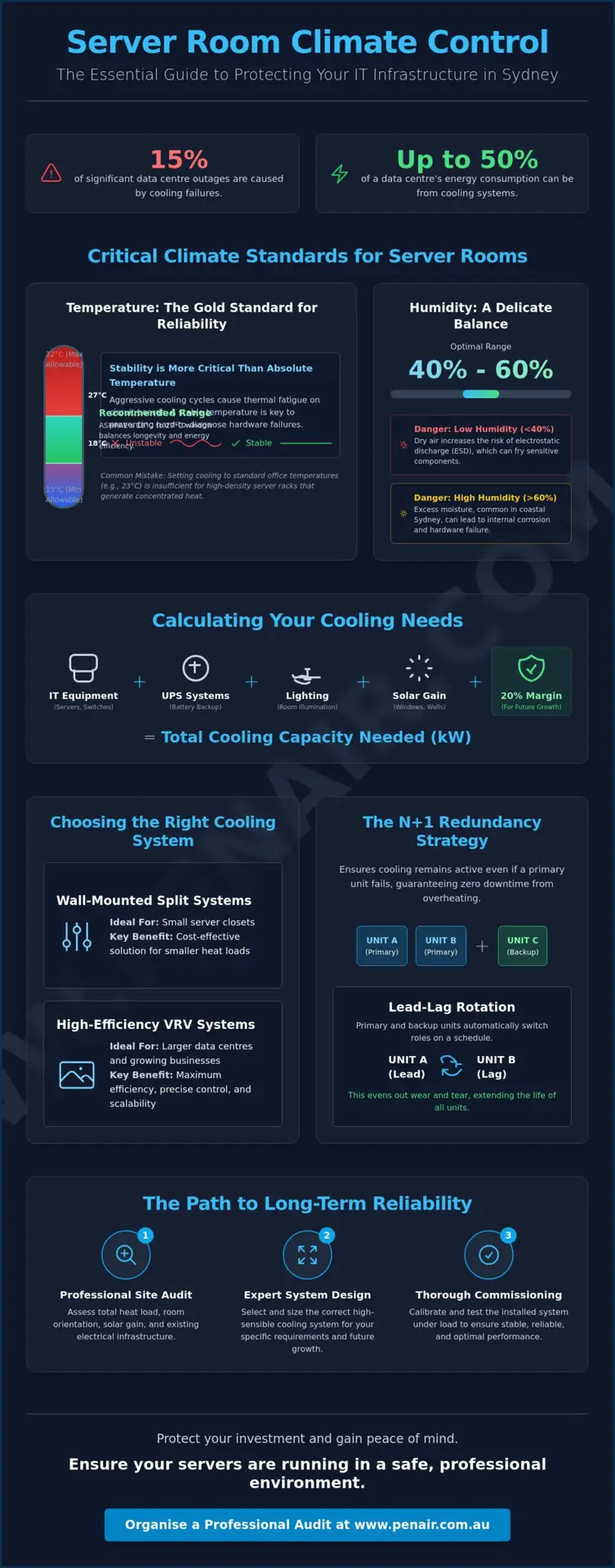
Choosing the right hardware is just as important as the temperature and humidity standards we discussed earlier. For small server closets or MDF rooms, wall-mounted split systems are often the most cost-effective way to meet your server room air conditioning requirements. These units are compact and reliable, provided they’re engineered for commercial use. If you’re managing a larger data centre or a multi-room office, a Daikin VRV system is the professional choice. These systems offer incredible scalability and energy efficiency by adjusting the refrigerant flow to match the exact cooling demand of each zone.
In environments where floor space is at a premium, ceiling cassettes are a brilliant alternative. They sit flush with the ceiling and provide 360-degree airflow, which helps eliminate hot spots in the corners of the room. For high-density setups where standard comfort cooling isn’t enough, we might recommend Precision Cooling Units (CRAC). These are designed specifically to handle high sensible heat loads and provide the precise humidity control that sensitive electronics demand. We’ve seen many Sydney businesses thrive by matching their equipment to their specific rack density rather than just the room size.
It’s tempting to look for a quick fix with a cheap portable unit or a basic residential split. However, these units aren’t built for a 24/7 duty cycle. A residential unit is designed to run for about 8 hours a day; a server room unit never gets a day off. Most domestic models also lack a “Low Ambient Kit,” which is essential for cooling your servers during a cold Sydney winter night when the outdoor temperature drops. As a Daikin air conditioning Sydney specialist dealer, we only install equipment rated for continuous commercial operation to ensure your hardware stays protected through every season.
Even the best air conditioner will struggle if the rack layout is messy. We recommend organising your racks into a hot aisle/cold aisle configuration to prevent “short-cycling.” This happens when the cold air from the AC unit gets sucked straight into the exhaust of the server without actually cooling the internal components. Simply installing blanking panels in the empty spaces of your racks can improve cooling efficiency by 15%. This is a practical, low-cost tip for Sydney SMEs with limited floor space who want to get the most out of their existing cooling capacity. By directing the airflow properly, you reduce the strain on your units and lower your monthly energy costs.
Reliability is the cornerstone of any professional data environment. While we’ve discussed the technical server room air conditioning requirements regarding temperature and load, those numbers mean nothing if a single mechanical failure brings your entire operation to a standstill. This is where N+1 redundancy becomes essential. In simple terms, “N” represents the number of cooling units required to handle your room’s total heat load, and the “+1” is an extra, independent unit. This setup ensures that if one system fails or requires maintenance, your hardware remains within safe operating limits without interruption.
To keep your systems in top shape, we often implement a “lead-lag” rotation. This strategy alternates which unit acts as the primary cooler, ensuring that wear and tear are distributed evenly across your equipment. It prevents one unit from burning out while the backup sits idle. We also highly recommend integrated remote monitoring. Modern systems can send SMS or email alerts the moment a room temperature creeps toward a critical 30°C mark. Having this early warning system allows your team to react before hardware begins to throttle or shut down. For Sydney businesses, having a local partner capable of a 4-hour response time is the final piece of the reliability puzzle, providing that essential peace of mind when things go wrong.
Sydney’s storm season can lead to unexpected power surges or blackouts. Your cooling system must feature an auto-restart function that brings the units back online immediately once power is restored. We also specialise in integrating HVAC systems with your existing building management system (BMS), allowing for centralised control and monitoring. If your system fails to reboot or shows signs of distress after a surge, you should look into professional air conditioning repairs Sydney to ensure your failover protocols are still functioning correctly.
Because server room units run 24/7, they require quarterly rather than annual maintenance. Our team focuses on high-risk components like condensate pumps. In a server environment, a blocked drain or a failed pump can lead to water leaks near live electrical racks, which is a recipe for disaster. Regular checks ensure filters are clean and refrigerant levels are optimal, keeping your energy costs down and your hardware safe. You can explore our comprehensive air conditioning service Sydney plans to keep your facility running without a hitch. If you need a custom redundancy plan for your office, get in touch with our specialist team today for a consultative audit.
Implementation is the final piece of the puzzle. We don’t just drop a unit in the corner and hope for the best. Our process begins with a detailed site audit where we map out your specific server room air conditioning requirements and identify potential hot spots. We’ve been a part of the Sydney community since 1999, and as a family-owned business, we understand that our reputation is built on the long-term reliability of our work. Whether you’re in a high-rise in the CBD or a warehouse in the Inner West, we bring a level of care that only comes from decades of local experience.
Coastal businesses face a unique challenge that many generic providers ignore. If your office is in Mona Vale or Palm Beach, the salt air can eat through a standard condenser in just a few years. We use specialised anti-corrosion treatments on all our coastal installations to protect the delicate fins and coils. This extra step is vital for server rooms because a failed outdoor unit on a 35°C day is a disaster you can’t afford. Our goal is to give you peace of mind, knowing your cooling system is as rugged as the hardware it protects.
We know that your business is constantly evolving. A cooling system that works today might struggle next year if you add a new high-density rack or a larger UPS. We design scalable solutions that grow with you, using energy-efficient Daikin technology to keep your 24/7 operational costs as low as possible. If you’re ready to upgrade your infrastructure, our Warriewood team can provide a comprehensive commercial site assessment to ensure your environment is future-proof and compliant with all hardware warranties.
Choosing an authorised dealer gives you access to commercial-grade hardware that simply isn’t available at retail outlets. These units are engineered for the high-duty cycles required by server environments. For larger offices, we often design sophisticated ducted air conditioning Northern Beaches systems that provide dedicated airflow to the server room while maintaining comfort in the main workspace. You’ll also benefit from a guaranteed warranty and genuine parts, ensuring your cooling remains reliable for many years to come.
Protecting your digital assets requires more than just a standard air conditioner; it demands a system engineered for the unique pressures of a 24/7 environment. We’ve explored how adhering to ASHRAE temperature standards and implementing an N+1 redundancy strategy can prevent costly hardware failures and downtime. By accurately calculating your heat load and choosing the right technology, you ensure that your server room air conditioning requirements are met with both precision and energy efficiency.
As an authorised Daikin Specialist Dealer and a family-owned business operating since 1999, we’ve spent decades mastering the specific commercial HVAC needs of our Sydney community. We’re here to help you navigate these technical standards and find a solution that offers genuine peace of mind. Our team is ready to ensure your hardware stays safe, no matter how high the mercury rises across the Northern Beaches or the CBD.
Protect your hardware with a professional server room cooling audit from PenAir today. We look forward to helping you build a more reliable future for your business.
The ideal temperature range for a small server room is 18°C to 27°C, which aligns with the ASHRAE industry standards. Maintaining this specific window ensures your equipment remains reliable while keeping your energy consumption at an efficient level. While servers can technically operate in warmer air, staying within this recommended range provides the best protection against hardware stress and thermal fatigue.
You should avoid using portable air conditioners for server environments because they aren’t designed for the 24/7 duty cycle that hardware requires. These units often have small water tanks that need manual emptying and lack the sophisticated sensors needed to meet strict server room air conditioning requirements. We always recommend fixed commercial systems that offer the professional reliability needed to prevent unexpected downtime.
You calculate the required cooling capacity by summing up the total wattage of all servers, UPS units, and lighting in the room, then dividing that total by 1,000 to find the kW. It’s a good idea to add a 20% safety margin to this figure to account for future hardware upgrades or extreme Sydney summer temperatures. This ensures your system isn’t constantly pushed to its absolute limit.
When cooling fails, your servers will quickly hit their thermal limits and begin “throttling” their performance to reduce heat. If the temperature continues to rise, the hardware will perform an emergency shutdown to prevent internal components from melting or warping. This leads to immediate business downtime and can cause permanent damage to sensitive circuit boards and storage drives.
Yes, your cooling system must run 24/7 because servers generate heat every second they are powered on. Even when your office is empty, your IT infrastructure is still processing data and creating a thermal load that must be managed. Commercial-grade systems are specifically engineered for this continuous operation, whereas standard residential units may fail prematurely under such a heavy workload.
N+1 redundancy is a safety strategy where “N” is the number of units required to cool your room and “+1” is an extra, independent unit. This setup ensures that if one air conditioner fails or needs a service, the additional unit can take over the full cooling load immediately. It’s the industry benchmark for preventing a single point of failure from crashing your entire network.
Server room air conditioners should be serviced quarterly because they run significantly more hours than a standard office system. Regular maintenance allows our team to check condensate pumps, clean filters, and ensure refrigerant levels are optimal for 24/7 operation. This proactive approach is essential for catching minor issues before they turn into expensive emergency repairs during a heatwave.
Humidity control is vital for protecting your hardware from both static electricity and corrosion. If the air is too dry (below 40%), the risk of electrostatic discharge increases, which can fry sensitive components. If it’s too damp (above 60%), moisture can lead to internal hardware corrosion. Keeping the room balanced ensures your electronics remain in a stable, safe environment.